Cell Value Types & Date Formatter
Date Formatter
By default, all datetime values returns as timestamp. But you can change this behavior using dateFormatter()
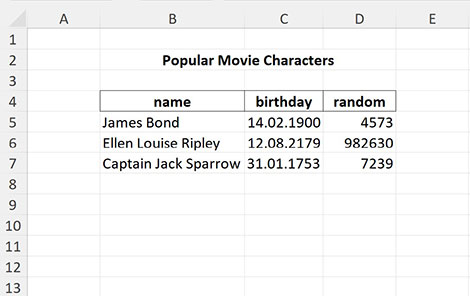
$excel = Excel::open($file);
$sheet = $excel->sheet()->setReadArea('B5:D7');
$cells = $sheet->readCells();
echo $cells['C5']; // -2205187200

// If argument TRUE is passed, then all dates will be formatted as specified in cell styles
$excel->dateFormatter(true);
$cells = $sheet->readCells();
echo $cells['C5']; // '14.02.1900'

// You can specify date format pattern
$excel->dateFormatter('Y-m-d');
$cells = $sheet->readCells();
echo $cells['C5']; // '1900-02-14'

// set date formatter function
$excel->dateFormatter(fn($value) => gmdate('m/d/Y', $value));
$cells = $sheet->readCells();
echo $cells['C5']; // '02/14/1900'

// returns DateTime instance
$excel->dateFormatter(fn($value) => (new \DateTime())->setTimestamp($value));
$cells = $sheet->readCells();
echo get_class($cells['C5']); // 'DateTime'

// custom manipulations with datetime values
$excel->dateFormatter(function($value, $format, $styleIdx) use($excel) {
    // get Excel format of the cell, e.g. '[$-F400]h:mm:ss\ AM/PM'
    $excelFormat = $excel->getFormatPattern($styleIdx);

    // get format converted for use in php functions date(), gmdate(), etc
    // for example the Excel pattern above would be converted to 'g:i:s A'
    $phpFormat = $excel->getDateFormatPattern($styleIdx);

    // and if you need you can get value of numFmtId for this cell
    $style = $excel->getCompleteStyleByIdx($styleIdx, true);
    $numFmtId = $style['format-num-id'];

    // do something and write to $result
    $result = gmdate($phpFormat, $value);

    return $result;
});
Built-in date formats and locale
Some cells use a built-in number format (numFmtId 14-22, e.g. the "short date" code 14) that carries
no explicit pattern in the file — Excel renders those against the regional settings of whoever opens the
workbook. Because this is a server-side reader, it resolves such codes to fixed, deterministic patterns,
so the same file produces the same output on any server, regardless of the process locale or of whether the
intl extension is installed:
$excel = Excel::open($file);
$excel->dateFormatter(true);
$cells = $excel->readCells();
echo $cells['B2']; // '01-23-85' — always, for a code-14 short date
If you do want locale-dependent rendering of these built-in codes, opt in explicitly with
useLocaleFormats() (requires the intl extension). Passing a locale makes the output reproducible;
passing nothing uses the process default locale:
$excel->useLocaleFormats('ru_RU')->dateFormatter(true);
echo $excel->readCells()['B2']; // '23.01.1985'

$excel->useLocaleFormats('en_US')->dateFormatter(true);
echo $excel->readCells()['B2']; // '1/23/85'
Note: this affects only the built-in codes 14-22. Formats that the file spells out explicitly (a custom
numFmt) are always used as written and are never touched by the locale.
Sometimes, if a cell's format is specified as a date but does not contain a date, the library may misinterpret this value. To avoid this, you can disable date formatting
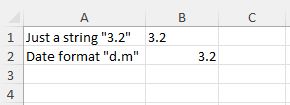
Here, cell B1 contains the string "3.2" and cell B2 contains the date 2024-02-03, but both cells are set to the date format
$excel = Excel::open($file);
// default mode
$cells = $sheet->readCells();
echo $cell['B1']; // -2208798720 - the library tries to interpret the number 3.2 as a timestamp
echo $cell['B2']; // 1706918400 - timestamp of 2024-02-03

// date formatter is on
$excel->dateFormatter(true);
$cells = $sheet->readCells();
echo $cell['B1']; // '03.01.1900'
echo $cell['B2']; // '3.2'

// date formatter is off
$excel->dateFormatter(false);
$cells = $sheet->readCells();
echo $cell['B1']; // '3.2'
echo $cell['B2']; // 1706918400 - timestamp of 2024-02-03
Cell value types
The library tries to determine the types of cell values, and in most cases it does it right. Therefore, you get numeric or string values. Date values are returned as a timestamp by default. But you can change this behavior by setting the date format (see the formatting options for the date() php function).
$excel = Excel::open($file);
$result = $excel->readCells();
print_r($result);
The above example will output:
Array
(
    [B2] => -2205187200
    [B3] => 6614697600
    [B4] => -6845212800
)
$excel = Excel::open($file);
$excel->setDateFormat('Y-m-d');
$result = $excel->readCells();
print_r($result);
The above example will output:
Array
(
    [B2] => '1900-02-14'
    [B3] => '2179-08-12'
    [B4] => '1753-01-31'
)