Getting Started
Choosing an opening method
Since 4.5, use an explicit factory when the format or API level is known:
| Method | Returns | Use |
|---|---|---|
Excel::open($file, $options) |
AbstractBook |
Detect XLSX/XLS/CSV by content |
Excel::openXlsx($file) |
Excel |
Require XLSX, without falling back to CSV |
Excel::openXls($file) |
XlsBook |
Require legacy BIFF8 XLS |
Excel::openCsvBook($file, $options) |
CsvBook |
CSV through the common book/sheet API |
Excel::openCsvReader($file, $options) |
CsvReader |
Low-level CSV engine |
CSV options accept an array, CsvOptions, or null. Explicit CSV factories accept an
empty CSV; the generic open() rejects empty input. open() only supports forcing
['format' => 'csv']; use openXlsx() or openXls() to require those formats.
Preparing for 5.0: openCsv() still returns CsvReader in 4.x, but is planned to
return CsvBook in 5.0. Replace low-level calls with openCsvReader() to retain
methods such as getCsvLine() and fromRow(). Choose openCsvBook() for book/sheet
code; getReader() on that book also provides the low-level engine.
isXlsx() checks a ZIP signature and isXls() an OLE2 signature; neither proves that
an arbitrary container is a supported workbook. validate() checks required XLSX
parts and XML well-formedness, not full OOXML schemas or formula correctness.
Simple example
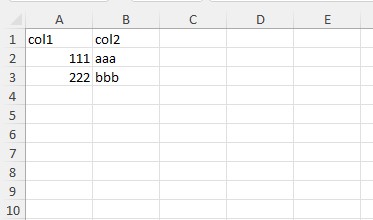
use \avadim\FastExcelReader\Excel;

$file = __DIR__ . '/files/demo-00-simple.xlsx';

// Open a spreadsheet: the reader is chosen by the file signature, so XLSX,
// legacy XLS (Office 97-2003) and CSV are all opened the same way.
// See docs/21-xls.md and docs/20-csv.md for what differs per format.
$excel = Excel::open($file);
// Read all values as a flat array from current sheet
$result = $excel->readCells();
You will get this array:
Array
(
    [A1] => 'col1'
    [B1] => 'col2'
    [A2] => 111
    [B2] => 'aaa'
    [A3] => 222
    [B3] => 'bbb'
)
// Read all rows in two-dimensional array (ROW x COL)
$result = $excel->readRows();
You will get this array:
Array
(
    [1] => Array
        (
            ['A'] => 'col1'
            ['B'] => 'col2'
        )
    [2] => Array
        (
            ['A'] => 111
            ['B'] => 'aaa'
        )
    [3] => Array
        (
            ['A'] => 222
            ['B'] => 'bbb'
        )
)
// Read all columns in two-dimensional array (COL x ROW)
$result = $excel->readColumns();
You will get this array:
Array
(
    [A] => Array
        (
            [1] => 'col1'
            [2] => 111
            [3] => 222
        )

    [B] => Array
        (
            [1] => 'col2'
            [2] => 'aaa'
            [3] => 'bbb'
        )

)
Open from a string or a stream
A workbook does not have to live on disk. When the bytes are already in memory — a database blob, an HTTP response body, an S3/Flysystem read — open them directly:
// From a string (e.g. a BLOB column)
$excel = Excel::openString($blob);

// From an open stream resource (URL, php://memory, Flysystem read stream)
$stream = fopen('https://example.com/report.xlsx', 'rb');
$excel = Excel::openStream($stream);
fclose($stream); // the caller keeps ownership of the stream
Both pick the reader by signature exactly like open(), so a string or stream
holding XLSX, XLS or CSV reads back identically to the same file on disk. They
accept the same $options as open() (e.g. ['format' => 'csv']). Internally
the content is copied to a temporary file, which is removed on script shutdown.
Streams are read from their current position without rewind; non-seekable inputs work. The caller retains ownership of the input even on failure. Failed writes or copies throw an exception and remove the created temporary file. Without an expected length or checksum, the library cannot detect external truncation when the stream itself reports a successful end of input.
Excel::validate($file, $errors) returns XML diagnostics for this call in $errors.
Missing required XLSX parts return false without XML errors; archive-open failures throw.
The libxml_use_internal_errors mode is restored; the shared libxml diagnostic buffer
is cleared before and after validation. Save earlier diagnostics first if you need them.
See also
- Reading Data — row by row, array keys, empty cells
- Advanced Reading — read areas, defined names, callbacks
- API Reference